edeca.net logo
  • rss
  • Home
  • Graphics
  • Electronics
    • PCB0002 – LED matrix
  • Computing
    • ROT Util
    • MOTD maker
    • GNU screen config
    • VB6 reverse DNS
    • VB6 RichTextBox control
  • About

MOTD maker

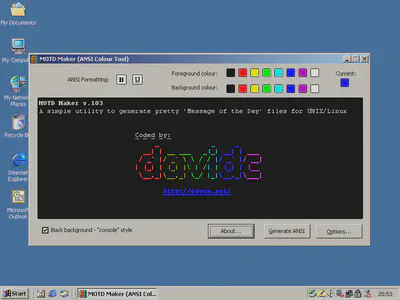
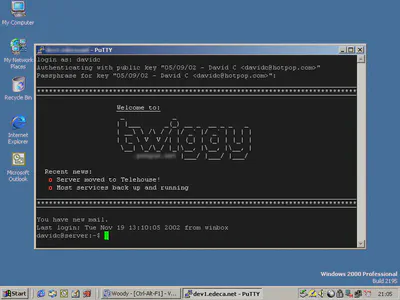
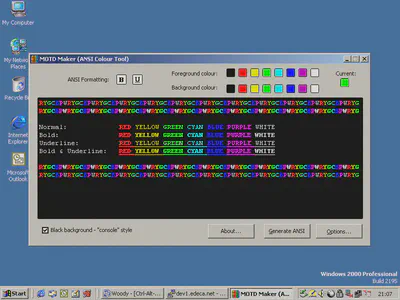
Most SSH servers issue a “message of the day” file when you log in to them, generally located at /etc/motd. This file can contain anything from news about the server to random ASCII art but sitting and typing in ANSI colour codes to emphasize text takes time.

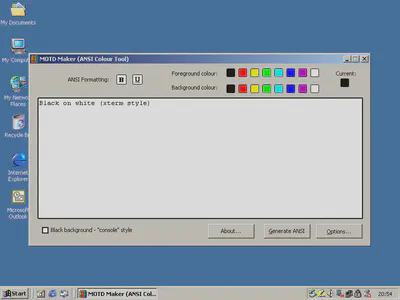
This program was written to make it easy to generate MOTD files that contain bold and underline formatting along with the 8 colours you can use.

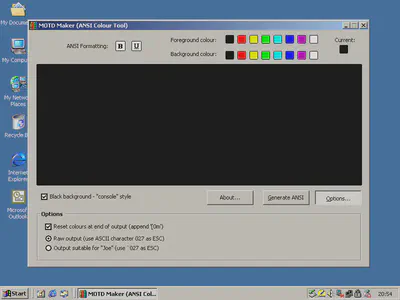
Currently the program allows you to output as raw ASCII (control characters saved as ASCII 027) or as the characters `027 (this is suitable for pasting into the editor joe, which I used before I discovered vim).

The “raw” output option is recommended, then copy the file straight over your existing /etc/motd using SCP or similar.

There is a subtle irony that it is a Windows program to create MOTD files for Unix servers however it was written when I was remotely administering Linux machines and had no access to them as a desktop development environment :)

Screenshots

motd1
motd2
motd3

motd4
motd5

Download

Download the full setup package – which includes all necessary dependencies

Comments rss
Comments rss
Trackback
Trackback

7 Responses to “MOTD maker”

  1. Nick says:
    March 19, 2010 at 1:47 am

    Cool tool! Thanks! Works for me on Windows 7 x64 RTM just fine.

    Now all my home lab servers have sweet looking MOTDs!

  2. Keenora says:
    March 11, 2011 at 12:12 pm

    Very nice dude :3 Thankees!

  3. Danny says:
    March 29, 2011 at 6:57 pm

    it is a cool program, but is very blank. You can’t make shapes, or put in logos, it doesn’t look like you can make it bigger, there are only 2 background colors, and is strictly text only. Next time you should add more features.

  4. David says:
    March 31, 2011 at 8:51 pm

    Danny, I’m super excited that you downloaded (for free) a program that I spend many hours on and found it useful! When you write a better version, please let me know so I can link it from here.

  5. pottsi says:
    April 2, 2011 at 1:45 pm

    Why would you want to put shapes into a console window? Putting images into a ssh banner won’t work so of course it’s text only.

    You can do some pretty awesome stuff with text ;) , so like david says i will look forward to your release.

    Good work David, you think you could implement it to work with wine for linux machines, i mean it opens and genarates the text but when it writes to file/clipboard code get’s messed up.

  6. RB says:
    May 23, 2011 at 4:24 pm

    Use this at work all the time – paired up with http://www.network-science.de/ascii/ this is a great little tool that has withstood the test of time rather nicely!

  7. David says:
    November 14, 2011 at 3:04 pm

    I love it !! thx

Leave a Reply

Click here to cancel reply.


Categories

  • Computing
  • Electronics
  • General
  • Perl
  • Photography
  • Uncategorized

Archives

  • February 2012
  • December 2011
  • November 2011
  • July 2011
  • June 2011
  • April 2011
  • March 2011
  • February 2011
  • December 2010
  • November 2010
  • October 2010
  • July 2010
  • June 2010
  • May 2010
  • April 2010
  • March 2010
  • February 2010
  • January 2010
  • November 2009
  • September 2009
  • August 2009
  • July 2009
  • June 2009

Links

  • My photo gallery
  • Pookey's site

Meta

  • Log in
  • Entries RSS
  • Comments RSS
  • WordPress.org
rss Comments rss valid xhtml 1.1 design by jide powered by Wordpress get firefox